Nachfolgeraum Request trial access

Trial access on request

The workspace for succession mandates where you decide who sees what


Run sell-side mandates in one place, from first draft to bid comparison. Your own buyers hear first, and for every single data point you decide who gets to see it. At any time you can show your client who saw what, and when. Built for succession and M&A advisers in Switzerland, Germany and Austria.

Nachfolgeraum is a reference project by BIZZqui. It shows how we build platforms where confidentiality is the foundation, not an add-on. On that foundation we also build your own solution, under your name and in your brand.

You test with sample data. We set up your access personally, usually within two business days.

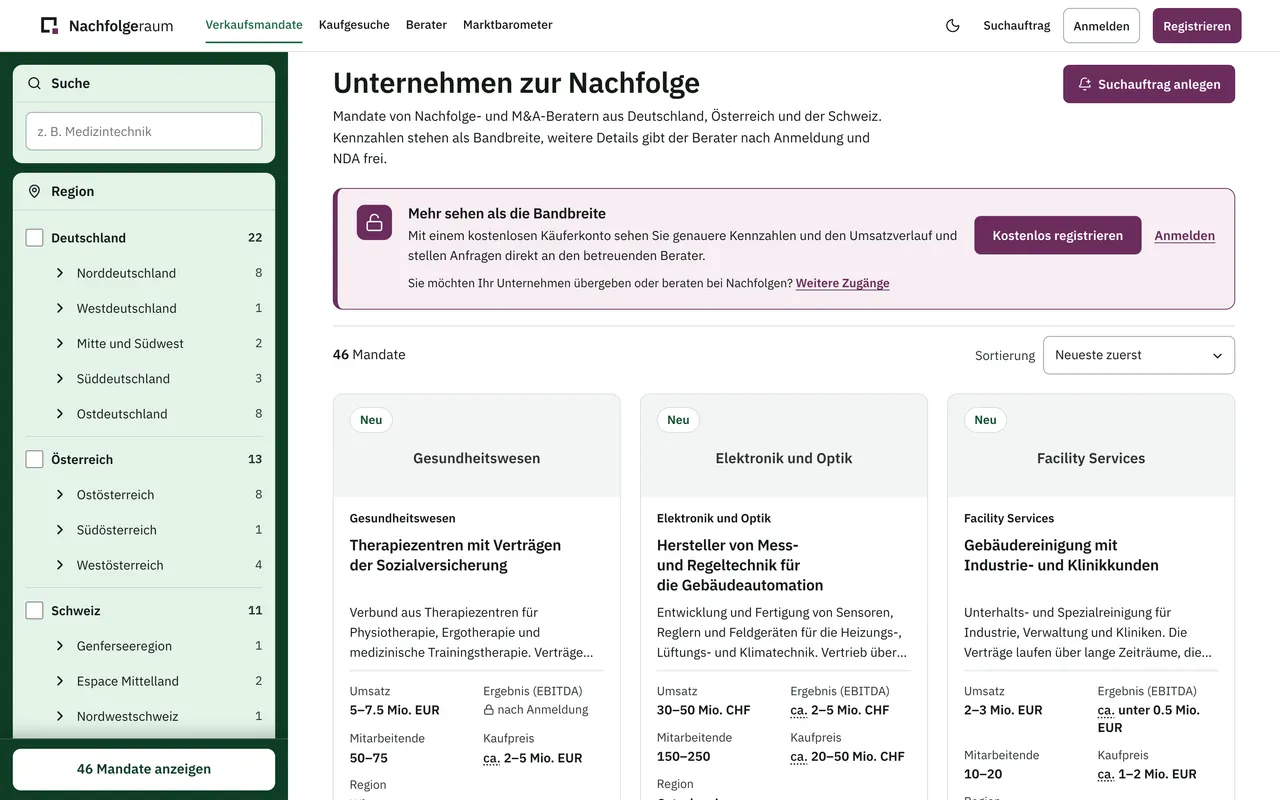
Nachfolgeraum showcase with sell-side mandates from Switzerland, Germany and Austria; revenue and asking price shown as ranges
What buyers see of your mandates in public: revenue and price only as a range, the location only as a canton or federal state.

Nachfolgeraum at a glance

Nachfolgeraum is software for business succession: a workspace for succession and M&A advisers in Switzerland, Germany and Austria in which they run sell-side mandates from first draft to bid comparison and decide, for every data point, who gets to see it. With its public showcase it is also a discreet business-succession marketplace. Nachfolgeraum is a reference project by BIZZqui Schweiz GmbH in Baar, Switzerland.

Who it is for
Succession and M&A advisers. Buyers, business owners without an adviser and specialists in valuation, tax, law, financing or mediation have their own areas.
Countries
Switzerland, Germany and Austria: cantons and federal states, CHF and EUR, NDA clauses for three legal systems.
Features
Visibility per data point in four levels, distribution in circles, enquiries with a reasoned fit, NDAs signed online, watermarked documents, bid comparison, chained audit log.
Data and security
Data centres in Germany. Company names and documents are stored separately and encrypted, sign-in requires a second factor, and no AI works on mandate data.
Devices
Web app for phone, tablet and desktop, plus an iPhone app with the same interface.
Pricing model
For your own solution: one-off setup, monthly flat fee and licences per active user. No per-mandate fees, no success fees, no share of the purchase price.
Project status
Pilot phase with sample data. Trial access on request, usually set up within two business days.
Publisher
BIZZqui Schweiz GmbH, Ruessenstrasse 12, 6340 Baar, Switzerland. On the same foundation BIZZqui builds solutions under its clients’ names and brands.
Last updated:

Today a mandate is scattered across spreadsheets, inboxes, PDFs and marketplace listings, and none of them protects your client

Today

The listing gives too much away

Exact revenue, headcount and location are enough to identify a company.

In Nachfolgeraum

Only ranges are public. Before a mandate leaves your office, Nachfolgeraum flags identifying details such as place names or exact figures, and you confirm each flag.

Today

Once the information memorandum is sent, it is out of your hands

A PDF can be forwarded to anyone.

In Nachfolgeraum

You release documents to each buyer individually, confidential ones only after a signed NDA. Every download is watermarked with name, company and time, and you can switch off downloading per document.

Today

Your client asks: who knows I am selling?

You answer from memory.

In Nachfolgeraum

You hand over the audit log as a PDF.

How a mandate runs: from a pasted listing to a side-by-side bid comparison

Step 1 · Import listings

Bring in your existing listings instead of re-entering everything

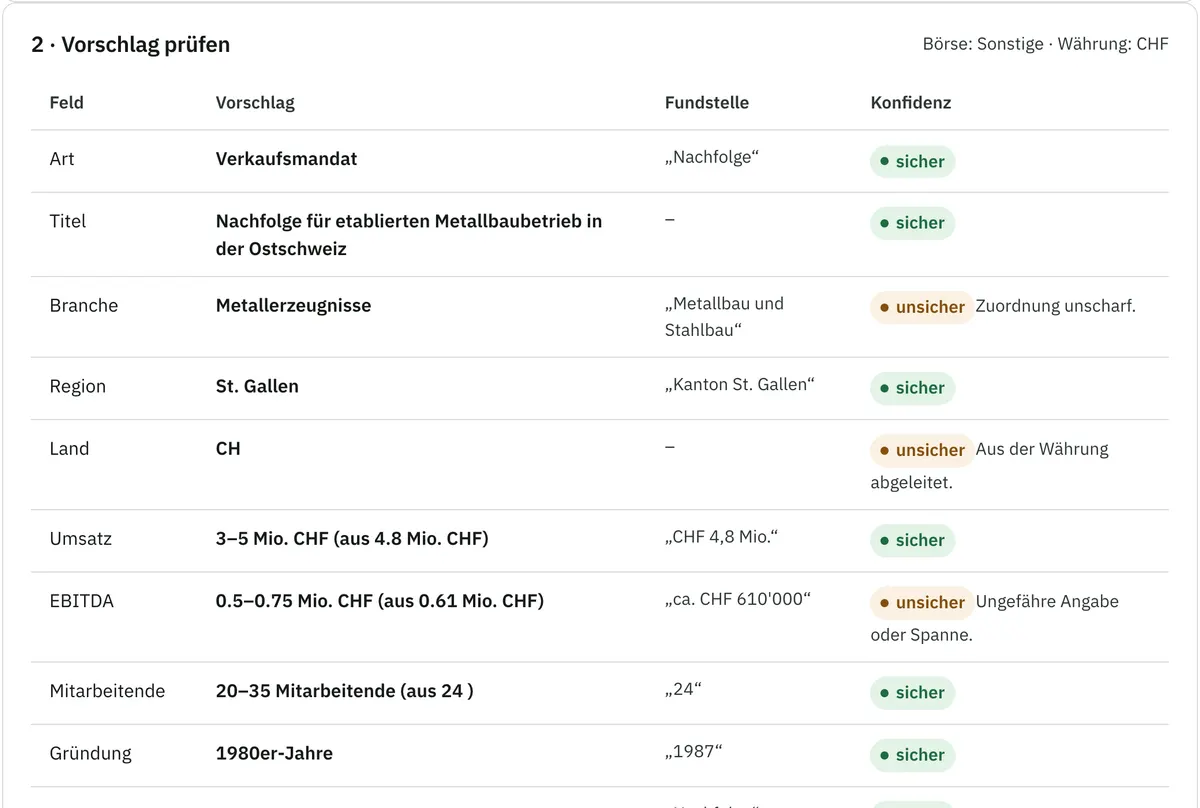
Paste the text of your listing or fill in the spreadsheet template. Nachfolgeraum recognises sector, region and key figures such as revenue, EBITDA, headcount and asking price, turns exact numbers into ranges and highlights what you still need to confirm. Everything starts as a draft that only your office can see.

Importing a listing text: recognised details shown as ranges, uncertain fields flagged for confirmation
A pasted listing after recognition: figures already appear as ranges, uncertain fields are flagged for confirmation. You review instead of retyping.

Step 2 · Set visibility

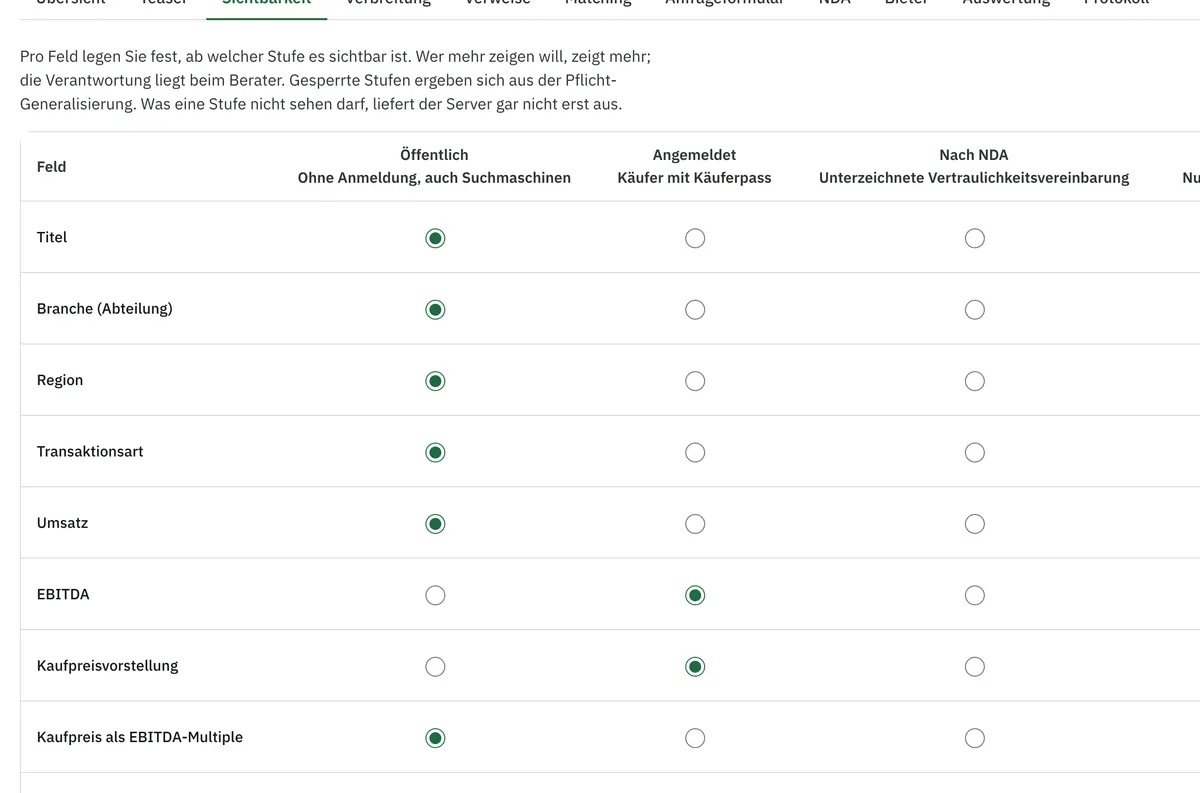
For every data point you decide who gets to see it

Four levels cover every mandate: all visitors, registered buyers, buyers with a signed NDA and, for the company name, only the people you approve one by one. At the top of each mandate, one sentence tells you who can see it right now.

Visibility settings of a mandate: for each data point the level public, after registration, after NDA or individual approval
Visibility settings of a mandate (detail): data points on the left, levels on the right. You see at a glance what a buyer learns before and after the NDA.

Step 3 · Widen the circle

Your own buyers hear about the mandate first, the public last or never

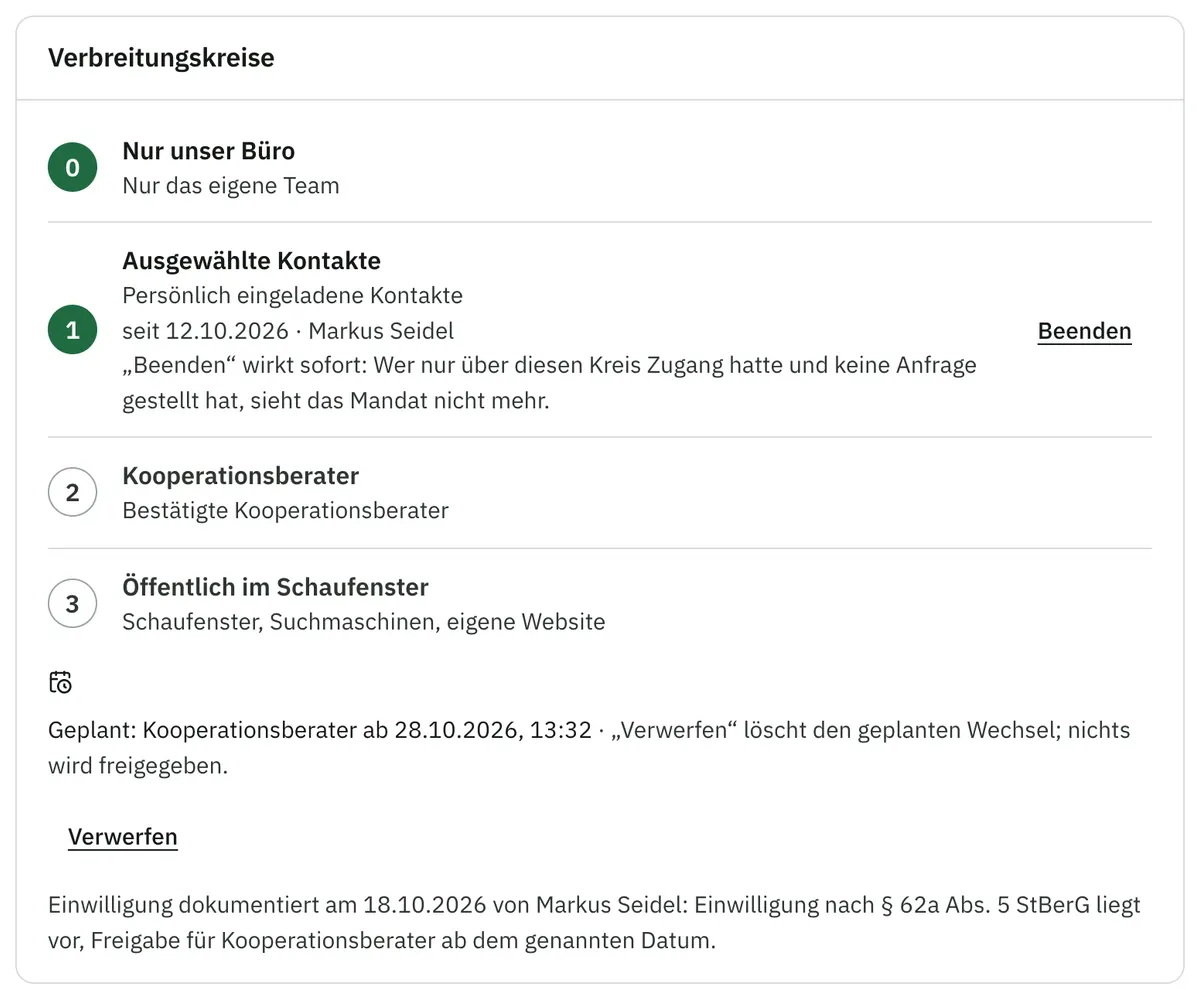
You start by inviting contacts from your own network, then selected partner advisers, and only then the public showcase. You open each further circle yourself; before a mandate goes beyond your own network, you record your client’s consent. Every button tells you beforehand what will happen next.

Distribution circles of a mandate: own office only, selected contacts, partner advisers and public, with a scheduled change and recorded consent
The distribution circles of a mandate: which circle is open, which change is scheduled and when the client’s consent was recorded.

Step 4 · Enquiries and NDA

Enquiries arrive with reasons attached, and buyers sign the NDA online

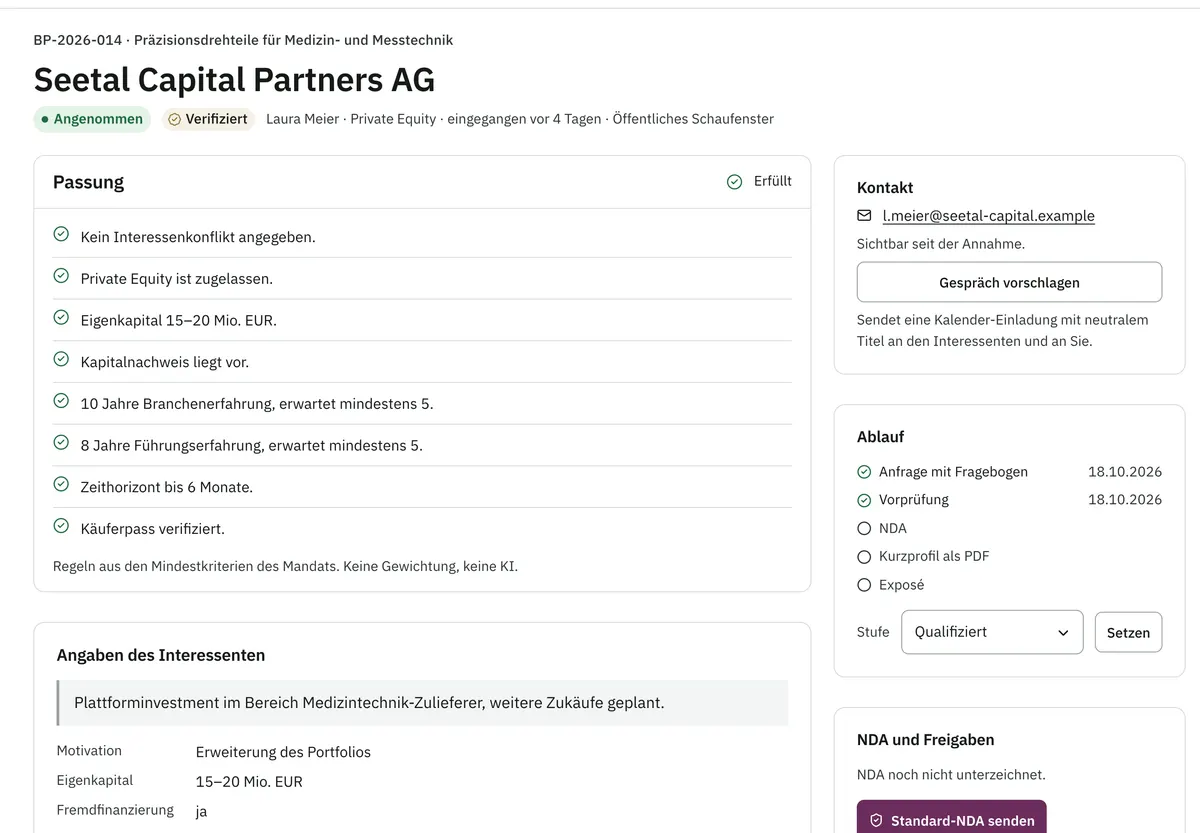
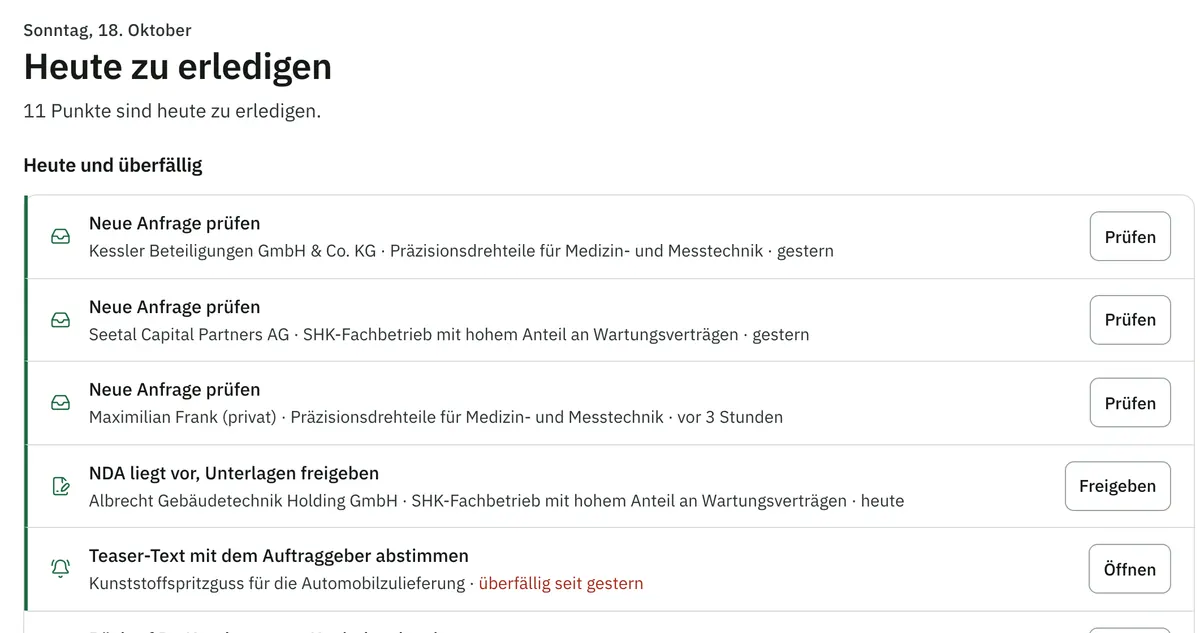
Every enquiry comes with the buyer’s profile and shows, for sector, region, size, price and type of acquisition, whether it fits, partly fits or does not. If you accept, one click sends the NDA from your template. Once it is signed, you release documents and the company name to each person individually. Every morning, the “To do today” list shows what needs your attention.

A buyer enquiry with fulfilled fit criteria and a button to send the standard NDA
Today’s to-do list: new enquiries, documents awaiting release after NDA, and follow-ups

Top: An enquiry with a reason for each criterion and the button for your standard NDA. You decide whether a call is worthwhile without having to ask first.

Bottom: “To do today”: new enquiries, documents waiting for release after an NDA, and follow-ups that are due. Nothing gets lost in your inbox.

Step 5 · Bids and audit log

Compare bids side by side and prove every disclosure to your client

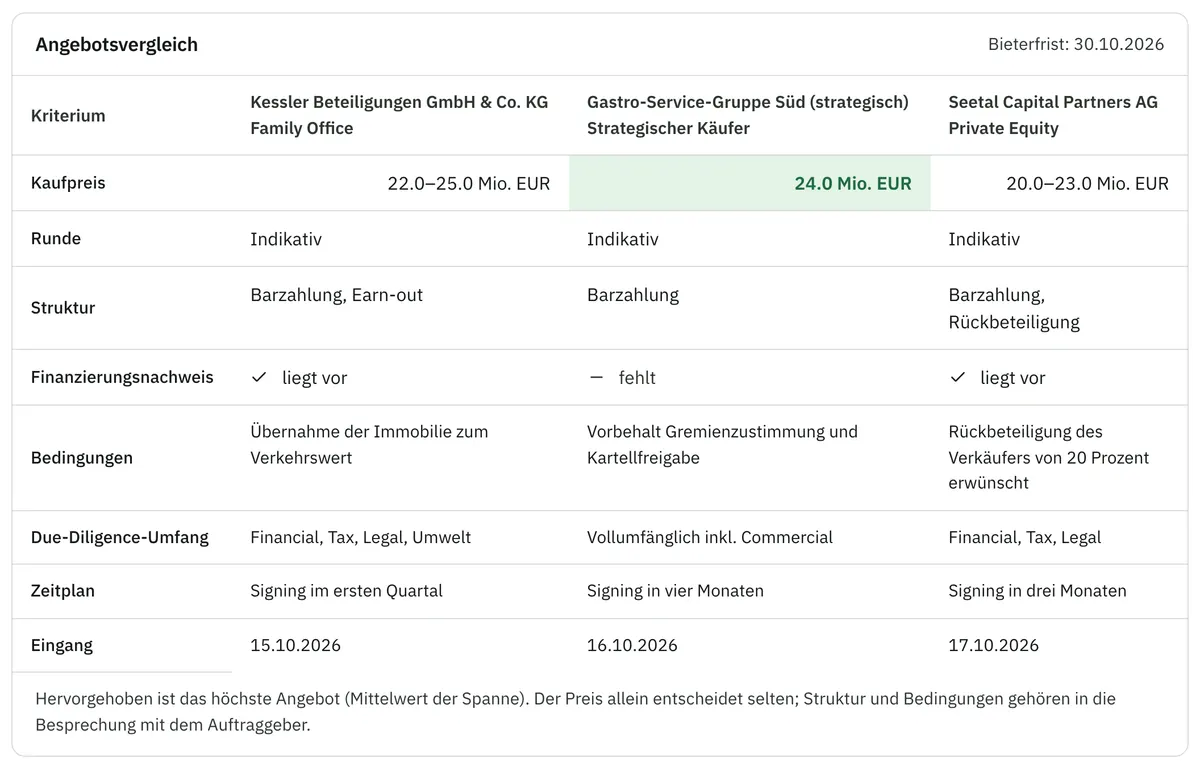
Invite prospective buyers to meetings with a calendar invitation, record their bids and compare them by price, structure, financing, conditions and timeline.

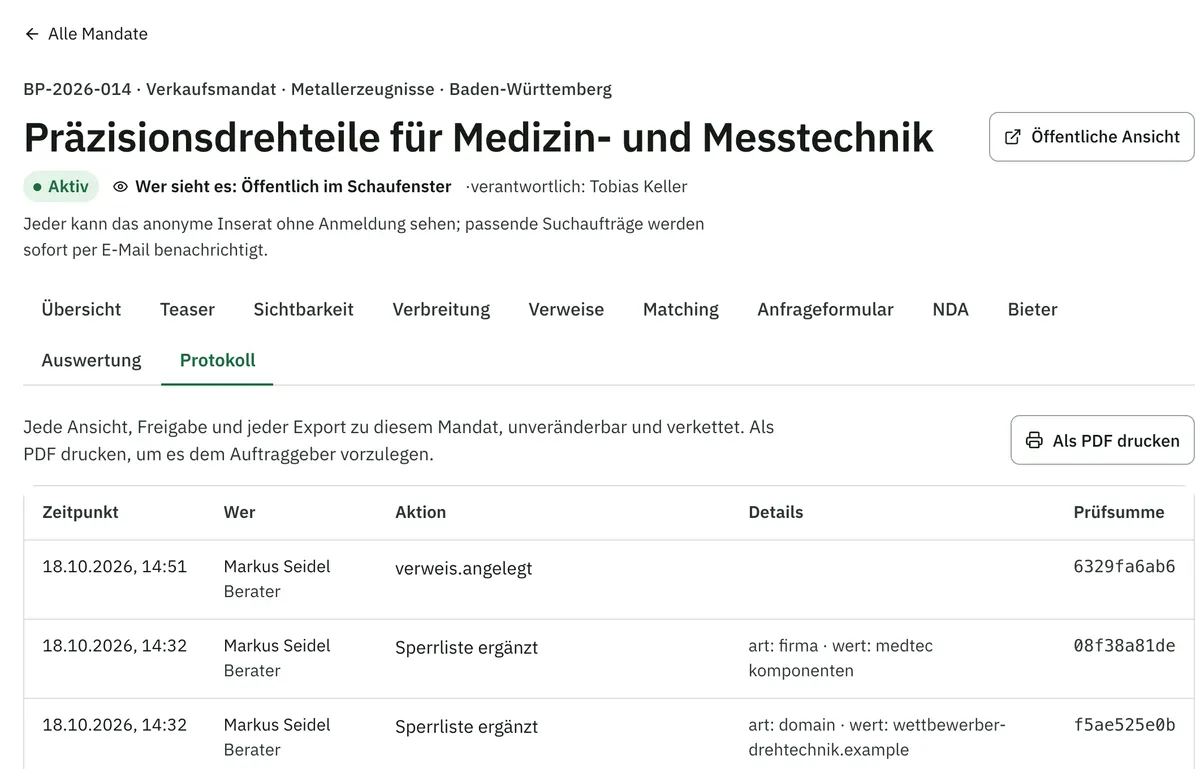
Every view, every release, every reveal of the company name and every export goes into the audit log. Entries are chained together, so any later change stands out. You print a mandate’s log as a PDF and present it to your client.

Bid comparison of three bidders by price, structure, proof of funds, conditions and timeline
Audit log of a mandate with time, person, action and checksum per entry, and a “Print as PDF” button

Top: Three bids side by side: price, structure, proof of funds, conditions and timeline. You can go through this overview directly with your client.

Bottom: The audit log of a mandate: who saw or released what, and when. It answers “Who knows I am selling?” in black and white.

Your very first mandate runs better here, with the buyers you already know

Your buyer network lives in one place and stays yours

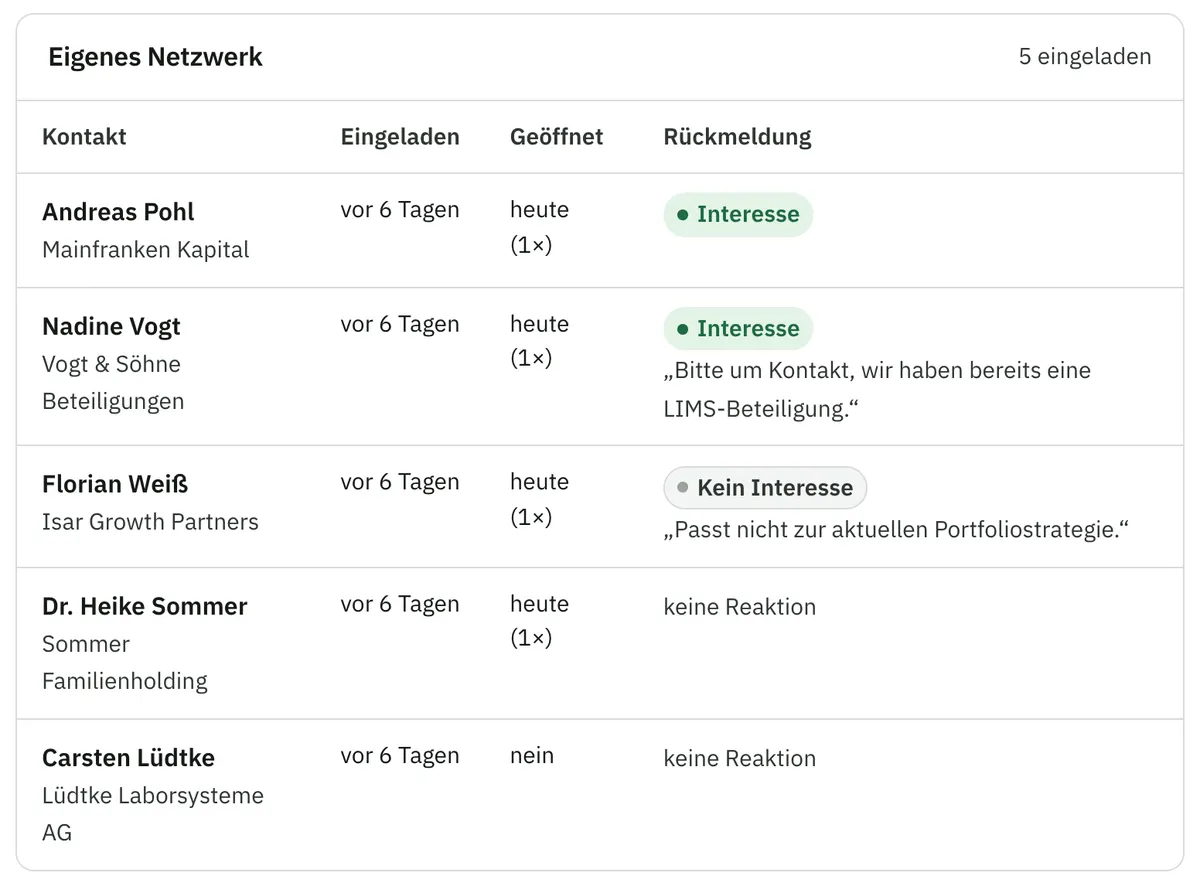
You keep buyer contacts and partner advisers in Nachfolgeraum and invite them to a specific mandate. Each receives a personal link, and you see immediately who opened it and how they replied. If you wish, a mandate stays within your network for good.

Own network for a mandate: five invited contacts with invitation date, whether they opened the link, and their reply
Your own network for a mandate: who is invited, who opened the link and how they replied. So you know where to follow up.

Keep track of parallel listings on other marketplaces

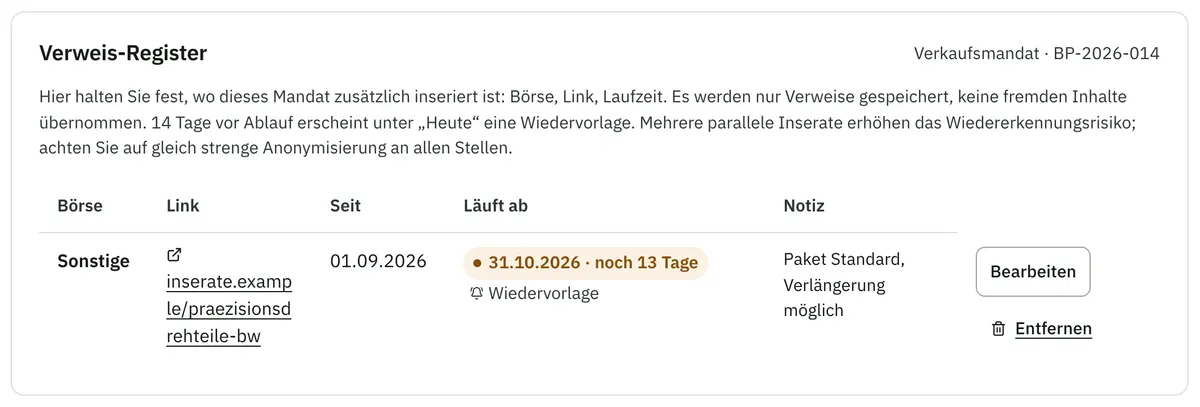
You record where else a mandate is listed and until when; Nachfolgeraum reminds you 14 days before a listing expires. The details are ready to copy as ranges. Nothing is transferred automatically, so you stay in control.

List of parallel listings with link, duration, expiry date and follow-up
Where else the mandate is listed, with expiry date and follow-up. No listing expires unnoticed or stays online after the sale.

Meetings land in the calendar you already use

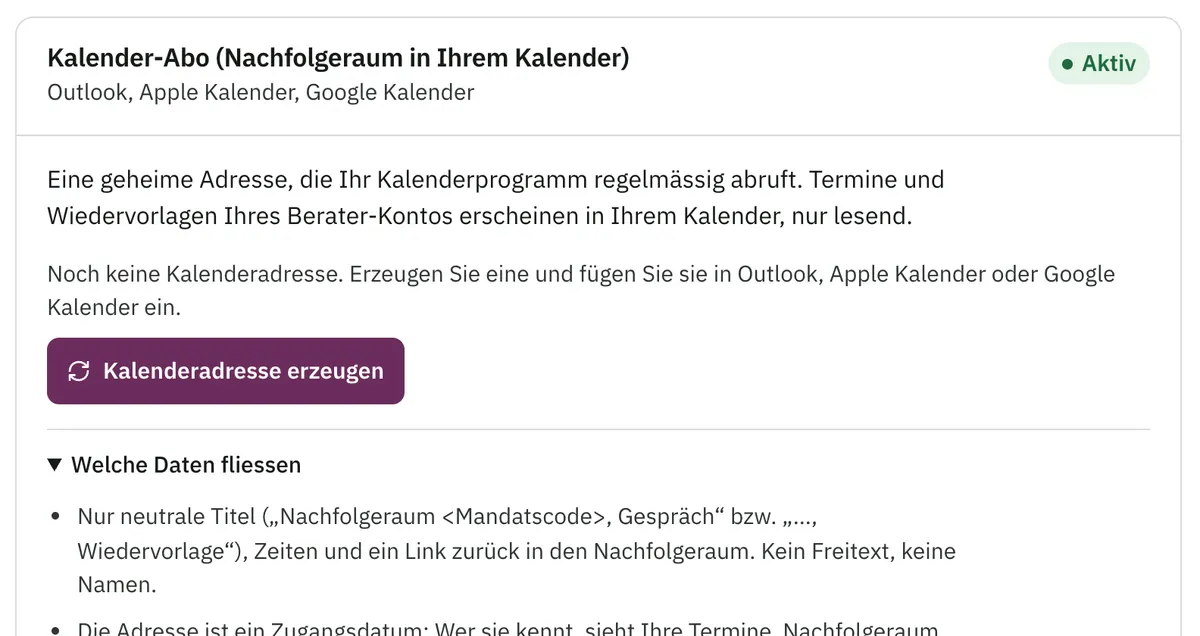
Meeting invitations arrive by email and work in Outlook, Apple and Google Calendar, including rescheduling and cancelling. You can subscribe to meetings and follow-ups as a calendar, with neutral titles and no names.

Calendar subscription in the settings: private calendar address for Outlook, Apple and Google Calendar
The calendar subscription in the settings: meetings and follow-ups appear in your usual calendar, read-only and with neutral titles.

Take your data with you at any time

Export contacts and prospective buyers as vCard or CSV, and enquiries, bids and the audit log as CSV. Every export is logged.

  • ContactsvCard · CSV
  • Prospective buyersvCard · CSV
  • Enquiries and bidsCSV
  • Audit logCSV

Your client stays in control, and buyers see more the more serious they are

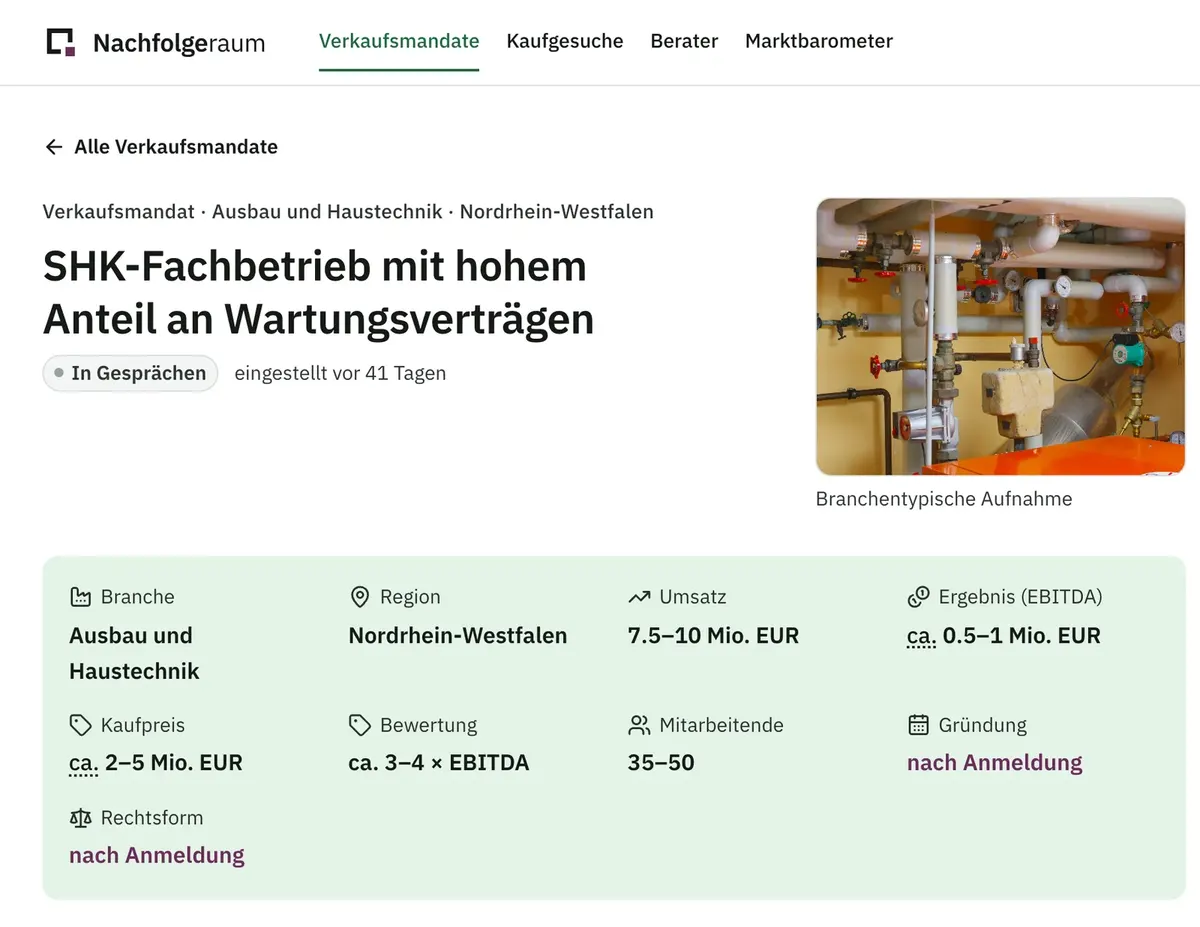
Public listing page with key figures as ranges and locked details that only appear after registration

A public listing: ranges instead of figures, locked fields only after registration. You can show this page to your client beforehand, so they see exactly what goes public.

What your client gains

  • No exact figures in public. Key figures appear as ranges, the region at most as a canton or federal state.
  • The company name stays protected. It is stored separately and encrypted, and released only after the NDA and to each person individually.
  • Unwanted parties stay out. You block companies and email domains; when signed in, they cannot see the mandate. Because nobody can be reliably excluded from a public showcase, a mandate can also run without any public listing at all.
  • Photos do not reveal a location. Location and camera data are stripped from uploaded images.
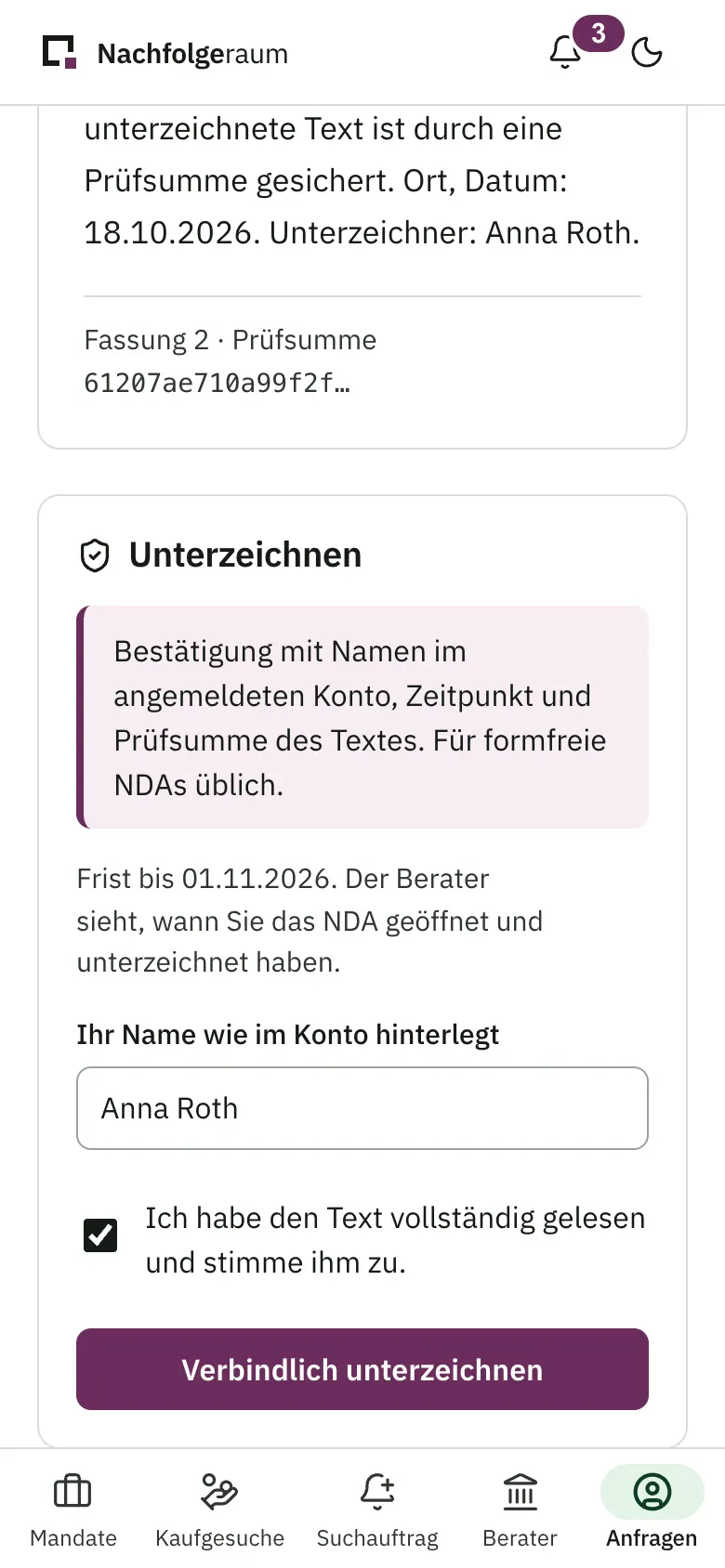
NDA on a phone: end of the agreement with checksum and signature with name confirmation

The NDA on a phone: the buyer confirms their name and signs. The fewer hurdles, the sooner you are in conversation.

What buyers gain

  • More insight with every step. Broad ranges in public, narrower ranges and a rounded trend after registration, exact values after the NDA.
  • One profile for every enquiry. Buyers complete their buyer pass once, and it accompanies every enquiry.
  • A clear status instead of silence. Buyers see whether their enquiry is under review, accepted or declined.
  • NDA without a printer. Read and sign on a phone, no printing or scanning.

Business owners who do not yet have an adviser send a confidential contact request and are referred to advisers who match their sector, region and size; their company does not appear in the showcase.

Specialists in valuation, tax, law, financing or mediation create a profile; Nachfolgeraum suggests them to advisers for suitable mandates.

Confidential information is kept separate, encrypted and open only to the people you approve

Data is hosted in data centres in Germany.

Company names and documents live in a separate vault

A dedicated service stores them encrypted, with its own key for each adviser account, apart from all other data.

What a buyer may not see is never sent to them

The database only releases the details of the buyer’s level. Showcase filters only work on public details, so hidden values cannot be guessed by narrowing down.

Each adviser account sees only its own data

The separation is enforced in the database itself and verified by automated attack tests.

Sign-in requires a second factor, and every access is recorded

Advisers also sign in with an authenticator app or a passkey. Views, releases and exports are recorded in the audit log (see step 5).

Bulk scraping of listings is made harder

Requests are rate-limited, a machine-readable reservation prohibits automated text and data mining, and individual listings do not appear in search engines.

No tracking cookies, no AI on your mandate data

No tracking cookies, no third-party analytics. If you want to measure visitor numbers, we can add cookieless measurement from an EU provider such as Plausible. No AI works on your mandate data: the check for identifying details and the fit assessment follow fixed, traceable rules.

Nachfolgeraum connects to the tools your office already uses

Email sending, sign-in, calendar, CRM, document storage and e-signature are set up individually for each office. In the trial you get to know the workflows with sample data.

Available in the trial today

Every step of a mandate, with sample data

  • Create mandates or import them from text and the spreadsheet template, visibility per data point, distribution in circles
  • Enquiries with buyer profile and reasons for the fit, NDAs from templates with online signature
  • Watermarked documents, release per person, bid comparison, audit log as PDF
  • Calendar invitations and subscription, export, two-factor sign-in, web app for phone, tablet and desktop

In the trial, emails go to a test inbox that you can view yourself.

Set up for your office

Connected individually for each office

  • Email sending from your own address
  • Sign-in with a Microsoft account
  • Microsoft 365 and Outlook calendar
  • Google Calendar
  • OneDrive and SharePoint
  • Excel files directly
  • CRM: HubSpot, Salesforce, Microsoft Dynamics 365, Zoho CRM; on request SAP Sales Cloud, Oracle Fusion Cloud Sales, SugarCRM
  • Advanced and qualified electronic signature
All features at a glance
AreaIn NachfolgeraumSet up for your office
Showcase Mandates and acquisition searches with filters for region, sector, size and price; adviser profiles; demand per sector; saved searches by email –
Listing Key figures as ranges, rounded trend after registration, optional price expectation as an EBITDA multiple, images without hidden metadata –
Visibility Level per data point, distribution in circles, invitations with replies, block list, flags for identifying details –
Enquiries Buyer pass, enquiry form per mandate, fit with reasons, accept and decline, status for buyers –
NDA Templates with clauses for CH, DE and AT, online signature (simple electronic signature) Advanced and qualified electronic signature
Documents Encrypted storage, watermark on every download, downloading can be switched off per document Storage in OneDrive and SharePoint
Workflow “To do today”, follow-ups, process templates, bid comparison with print view –
Audit log Tamper-evident, per mandate and overall, as CSV and PDF, integrity check at the click of a button –
Integrations Calendar invitation and subscription, vCard/CSV export, import from text and spreadsheet template, list of parallel listings Email sending from your own address, Microsoft sign-in, Microsoft 365 and Outlook calendar, Google Calendar, CRM (HubSpot, Salesforce, Microsoft Dynamics 365, Zoho CRM; on request SAP Sales Cloud, Oracle Fusion Cloud Sales, SugarCRM), Excel files directly
Access and devices Two-factor sign-in with authenticator app or passkey, web app for phone, tablet and desktop Sign-in with a Microsoft account

Product names mentioned are trademarks of their respective owners; there is no affiliation with the manufacturers.

In the trial you run a mandate with sample data from start to finish

We set up your trial access personally and usually get back to you within two business days with your login details and a short guide. You work with realistic sample data and try Nachfolgeraum as an adviser, a buyer or a business owner. Nachfolgeraum charges no success fee and takes no share of the purchase price.

  1. You send your requestFour required fields, no details about mandates.
  2. Christine Holst gets in touchUsually within two business days, by email with your access.
  3. You try it outA guided walkthrough takes you through a mandate step by step; you give feedback directly in the trial.
Christine Holst, Managing Director of BIZZqui

Before we talk about technology, I want to understand how your firm works today and whom you want to bring together. Write to me, via the form or directly by email.

Christine Holst
Managing Director, BIZZqui
c.holst@bizzqui.com

Request trial access

Four required fields. Please do not include confidential details about a company or mandate.

We will send your access to this address.

* Required field. Your details are transmitted to info@bizzqui.com via our hosting provider and our email service. We use them only for your request and the trial, do not pass them on, and delete them no later than 12 months after our contact ends, unless we are legally required to keep them. Controller: BIZZqui Schweiz GmbH, Ruessenstrasse 12, 6340 Baar, Switzerland. Access, rectification, erasure and objection: info@bizzqui.com.

What advisers ask before the trial

Terms explained (in German): NDA · Data room · Due diligence · Information memorandum · Letter of intent · Business transfer

What is Nachfolgeraum?

Software for succession and M&A advisers: they run sell-side mandates in it from first draft to bid comparison and decide, for every data point, who gets to see it. The public showcase shows mandates only with ranges instead of exact figures. Nachfolgeraum is a reference project by BIZZqui.

Who is behind Nachfolgeraum?

BIZZqui Schweiz GmbH in Baar, Switzerland. Nachfolgeraum is its reference project and shows how BIZZqui builds platforms where confidentiality is the foundation. On that foundation BIZZqui also builds solutions under its clients’ names and brands (see “For organisations”).

Is it worth it without many buyers on the platform?

Yes. You invite your own buyer contacts and partner advisers, and if you wish, a mandate stays within your network for good. You use NDA, releases, bid comparison and audit log regardless of how many buyers are searching in public (see “Your very first mandate runs better here”).

Can I import existing listings?

Yes, by pasting the listing text or filling in the spreadsheet template. Step 1 shows how it works.

Is this a virtual data room?

No. Nachfolgeraum stores company names and PDF documents encrypted and watermarks them on every download. For due diligence with a folder structure and Q&A, you continue to use a specialised data room.

Where is the data stored?

In data centres in Germany. Company names and documents are kept encrypted by a separate service, with its own key per adviser account (see Security).

Does it work with Outlook?

Yes. Meeting invitations and the calendar subscription work in Outlook, Apple and Google Calendar, without Nachfolgeraum needing access to your mailbox. A direct Microsoft 365 integration can be set up for your office on request.

How is the price structured?

In three parts: your own solution based on Nachfolgeraum consists of a one-off setup, a monthly flat fee for operation, and licences per active user. There are no per-mandate fees, success fees or shares of the purchase price. You receive a binding quote after the initial meeting, tailored to your firm.

How does the buyer sign the NDA?

Online: the buyer reads the NDA in the browser, confirms their name and signs (simple electronic signature). You send it from your template, with clauses for Swiss, German and Austrian law. A digital fingerprint of the text records which version was signed. An advanced or qualified electronic signature can be set up for your office on request.

Nachfolgeraum

A reference project by BIZZqui

For organisations: how we built Nachfolgeraum

Starting point

Anyone handling succession mandates works with spreadsheets, inboxes, PDFs and marketplace listings. None of these tools proves to the client who saw what, and none prevents a listing from giving the company away.

Requirements

  • Visibility configurable for every single data point
  • Adviser accounts strictly separated from each other
  • Company names and documents stored separately and encrypted
  • An audit log that cannot be changed unnoticed after the fact
  • One interface for phone, tablet, desktop and iPhone app, for Switzerland, Germany and Austria (cantons and federal states, CHF and EUR, NDAs under three legal systems)

Solution

  • Access rules in the database itself, on every table. Even a bug in the interface therefore cannot expose other accounts’ data.
  • A dedicated vault service for company names and documents: envelope encryption (every data key is itself encrypted), keys per adviser account kept apart from the database, watermarks on every download.
  • A chained audit log: every entry carries the digital fingerprint of the previous one, so any change shows up on verification.
  • Aligned with OWASP ASVS Level 2, a recognised catalogue of security requirements for web applications.
  • One web app for all devices and an iPhone app that uses the same interface; easy to read, fully keyboard-accessible, charts also available as tables.

Status

Nachfolgeraum is running in a pilot phase with sample data. Automated database and attack tests verify that adviser accounts stay separate and that buyers only see what they are entitled to. Before your own solution goes live, it undergoes an external penetration test by specialists, a formal accessibility audit (WCAG 2.2 AA), and distribution of the iPhone app via TestFlight, Apple’s testing platform.

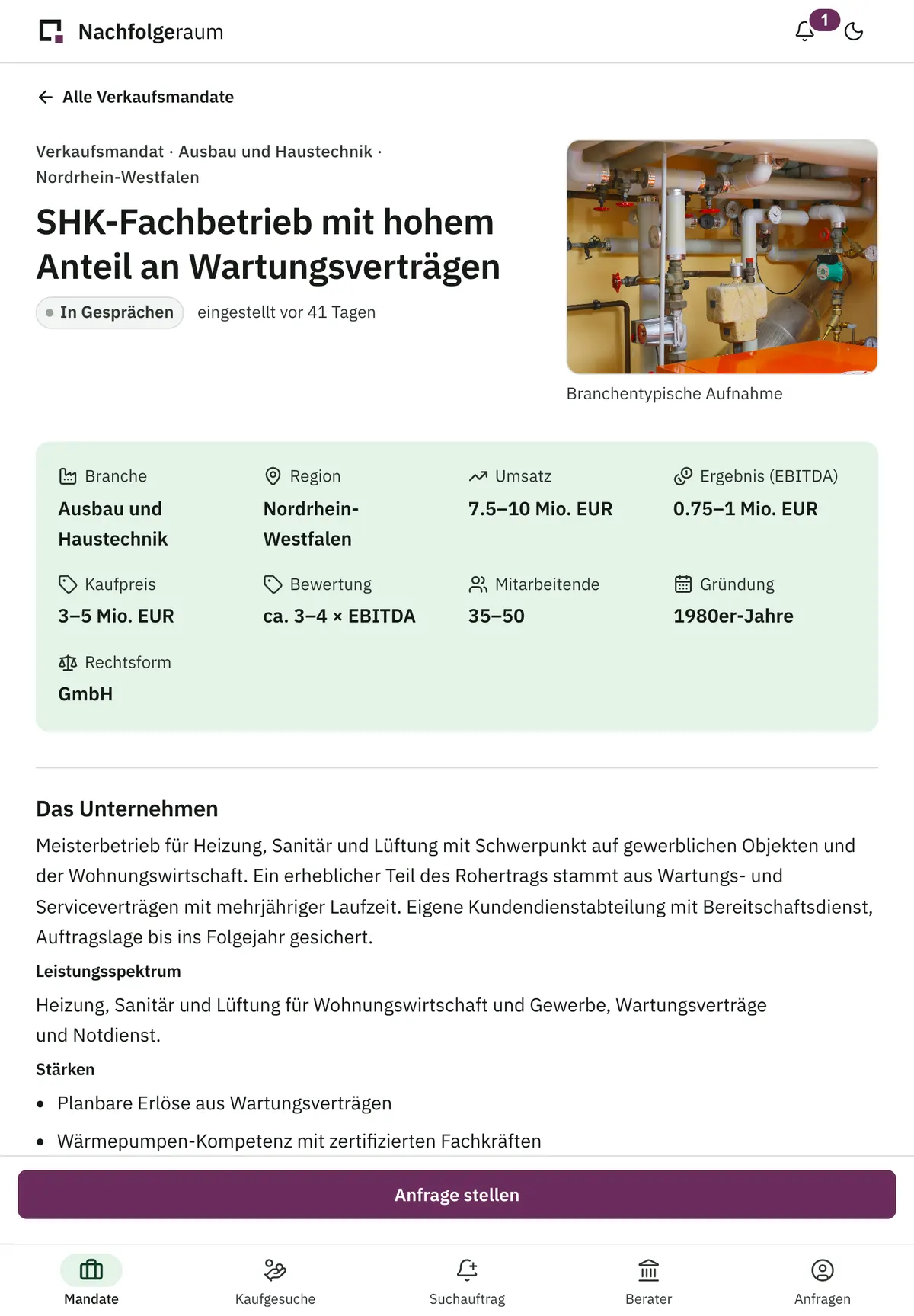
Listing page on a tablet with key figures as ranges
Buyer area on a phone with enquiries and status
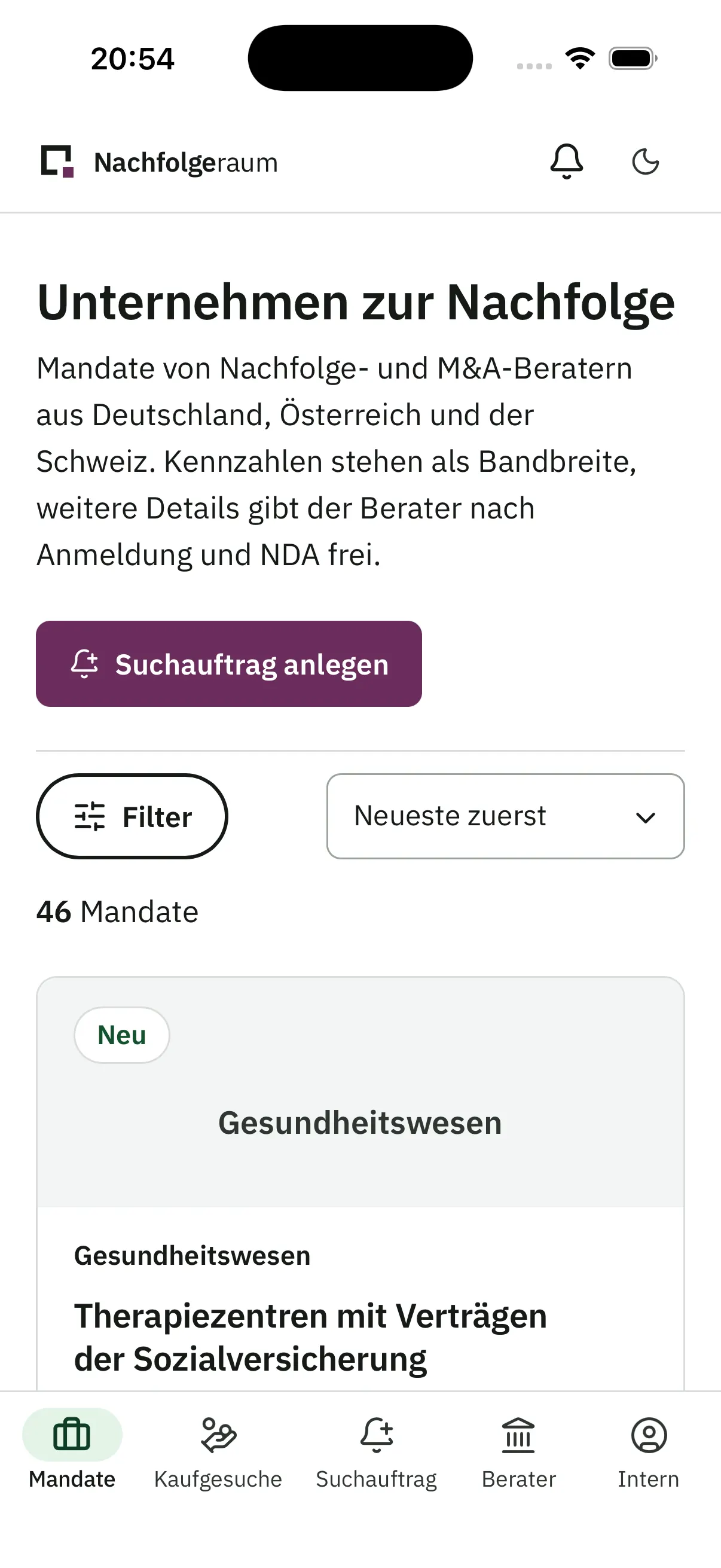
iPhone showing the Nachfolgeraum showcase in the iOS app

The listing page on a tablet: one interface adapts to phone, tablet and desktop, with no separate version per device.

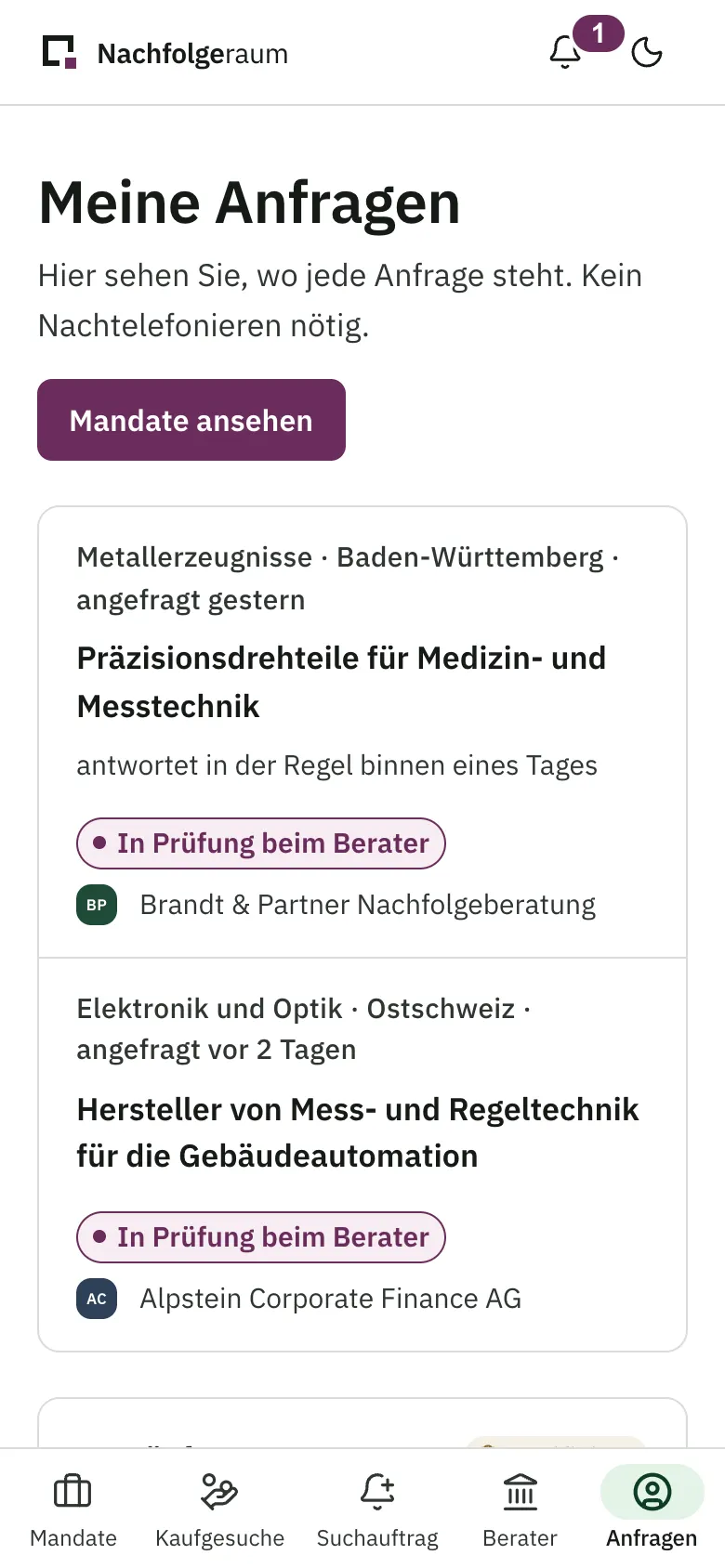
The buyer area on a phone: buyers see the status of every enquiry and do not need to chase.

The iPhone app shows the same interface as a native app. One development effort delivers both a browser experience and an App Store presence.